Every month we publish here what you can already use: improvements across CRM, quoting, production, logistics, invoicing, Nexus Clad and the dealer channel. No promises — only what is in the platform.
Clad doors, sliding doors that disappear into the wall and a shop floor that sees every window in 3D
The biggest release of the year: more than 80 improvements. The configurator builds new things, the shop floor works with less paper and learning Nexus no longer depends on asking someone.
Doors and fixed lights with sheet cladding, from quote to the Cladding station
In the Leaf finish block you choose, leaf by leaf or on a fixed light, the system’s sheet and its colour on each face. If the finish allows glass, you draw where it goes. And with By leaf side you decide whether the sheet overhangs or folds at the hinges, the handle, the top or the bottom.
The shop floor gets a new station, Cladding, with the pending leaves and what each one needs. The Cutting and folding station shows every sheet with its flat pattern and folds, and gives you its DXF.
Sliding doors that disappear into the wall
If your system supports it, a sliding door can be a pocket slider: the leaf slides into a pocket in the wall, with a visible or concealed box, and the 3D view draws it. There are also more sliding types and different default profiles for each section.
If a saved design no longer matches your catalogue, the Sliding door out of date notice says what changes and Reinsert sliding door brings it up to date.
Triple glazing and a new glass picker
Glass is chosen from cards —single, double, triple or panel— and the build-up is filled in from outside to inside, layer by layer, with the total thickness shown live (for example, 4/16/4/16/4 · 44 mm). The same applies when buying glass or adding it to a project.
Manufacturing variants and cuts using the catalogue formula
When the catalogue allows something to be built two ways (visible or hidden frame drainage, for example), the system records it as a variant and you pick it while designing. And each system accepts the manufacturer’s cutting formulas (leaf = L/2 − 39), first in shadow mode so you can compare before switching them on.
Every station on the shop floor sees the window in 3D
Press View in 3D (or the 3 key) and the window opens exactly as it was sent to the shop floor, with a coloured number on each part and its details alongside: length, quantity and where it goes. Pergolas and awnings come with their dimensioned plan, elevation and side view.
A shop floor with less paper and fewer slip-ups
Operators sign in with their card: swipe it through the reader or scan it with the camera. Their time runs on one station only, so starting on another stops the previous one automatically. And if a bar breaks, Broken bar puts its cuts back on the list to be made from a new bar.
The Glazing station shows each glass pane only once with its size and build-up, and the new sections for assembly PDF gives one sheet per window with the elevation and its cuts.
The sun button in the solar shading editor adds real shadows on the structure, the wall and the ground, reflective glass and the sky: an image to show the customer without leaving the quote. Vertical awnings can have a window or insect screen in the fabric, and the editor warns you about what cannot be built: a beam with no support or a post with no beam.
Nexus Clad: balconies, one-piece corners and a picture of the building
You define balcony types (projecting or recessed, with a solid parapet or a railing) and place them on the floor slabs: they repeat floor by floor or along the wall. At corners, the panel for both walls comes out as a single folded piece, with no joint, if it fits on the sheet.
With everything calculated, you make the changes you need and recalculate just once. And the 3D viewer’s presentation mode adds shadows, glass and sky so you can show the building in the proposal.
Settle or postpone a due payment in one click · a different VAT rate on each purchase line, to record the supplier invoice exactly as it is · carry corrected prices from a purchase order to the item record · reserve material by ticking boxes and see every reservation on one screen · stock shows the item photo · your session recovers on its own when you come back to the tab · report viewer with favourites and sending by email · shortcuts to your screens in My space.
Every part on the shop floor carries its own QR, installations are checked off from a phone, and what gets deleted can be restored
A month spent closing the loop between office, shop floor and site: the codes are born when a job is sent to production and travel with every part until it is installed.
One QR per part, from release to production to the final label
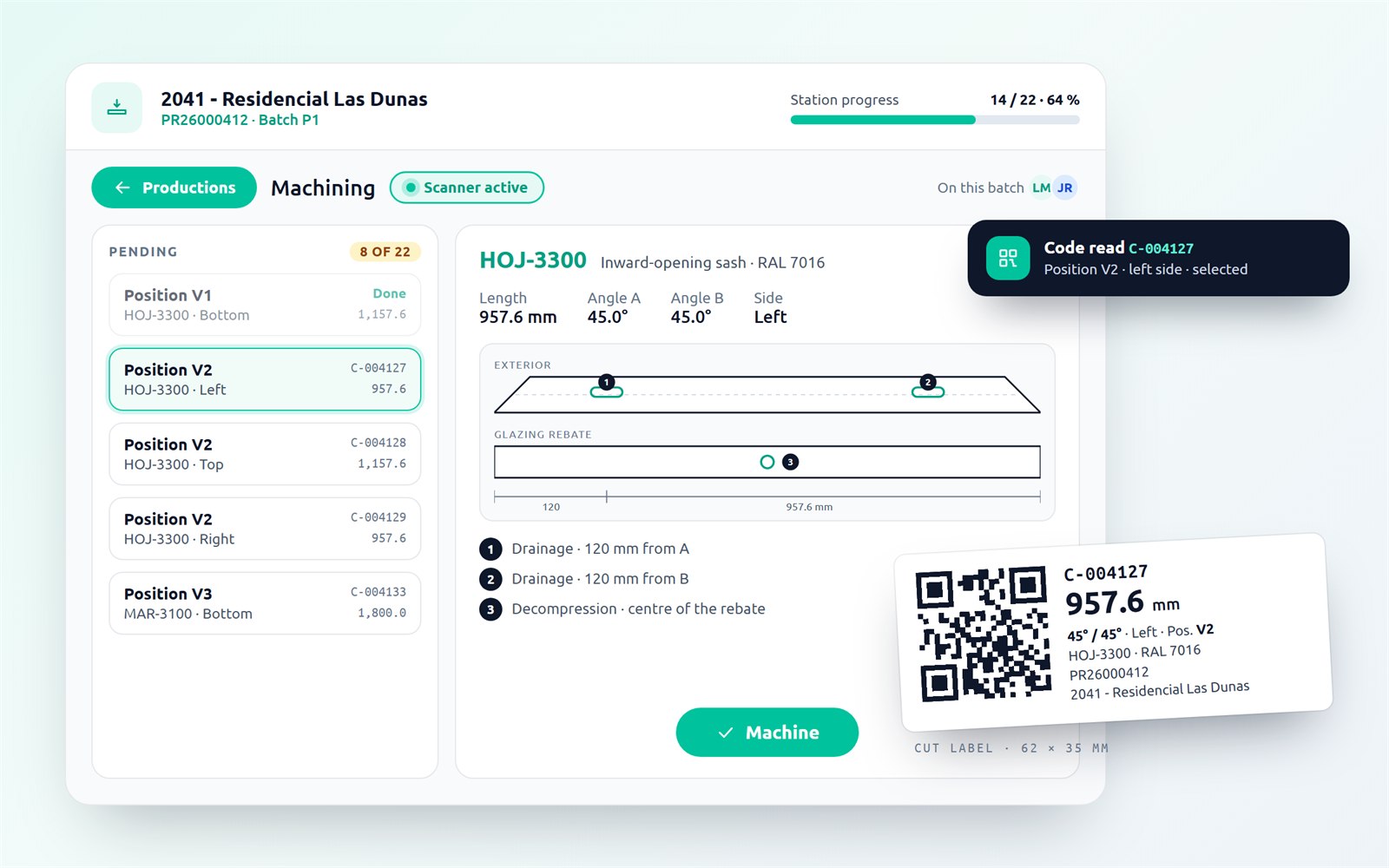
When a job is sent to production, Nexus creates a scannable code for every cut, machining, frame, glass pane and unit. Stations read it with a handheld scanner — or with the camera on a tablet or phone — and select the item on their own; if the code belongs to another job or is already done, Nexus says so. The same QR appears on the work order, the cutting report, the assembly instructions and the label stuck on the profile.
Two extras: when glass is ordered, the email to the supplier attaches a sheet of QR labels so every pane arrives identified; and the finished-product label can carry a public QR with the product sheet — dimensions, colour, date and contact details; never customer or prices.
Shop floor: on tablet and phone, with station order under control
Every station monitor now works on tablet and phone without losing features: a step bar shows one area at a time and the action button always stays in view. On large screens there is an optional shop-floor view with batch progress in the header.
New sequence mode: free as before, per batch (a station does not open until the previous one is finished) or per item (each bar, frame or unit enters as soon as its previous step is done). Blocked items show a padlock and the reason; overriding asks for a justification and is logged.
And the paperwork writes itself: work order, cutting report, bars with machinings and assembly instructions as PDFs when the job is sent to production, and one click away from the sales document and the control station.
Installation: on-site check with photos and real times
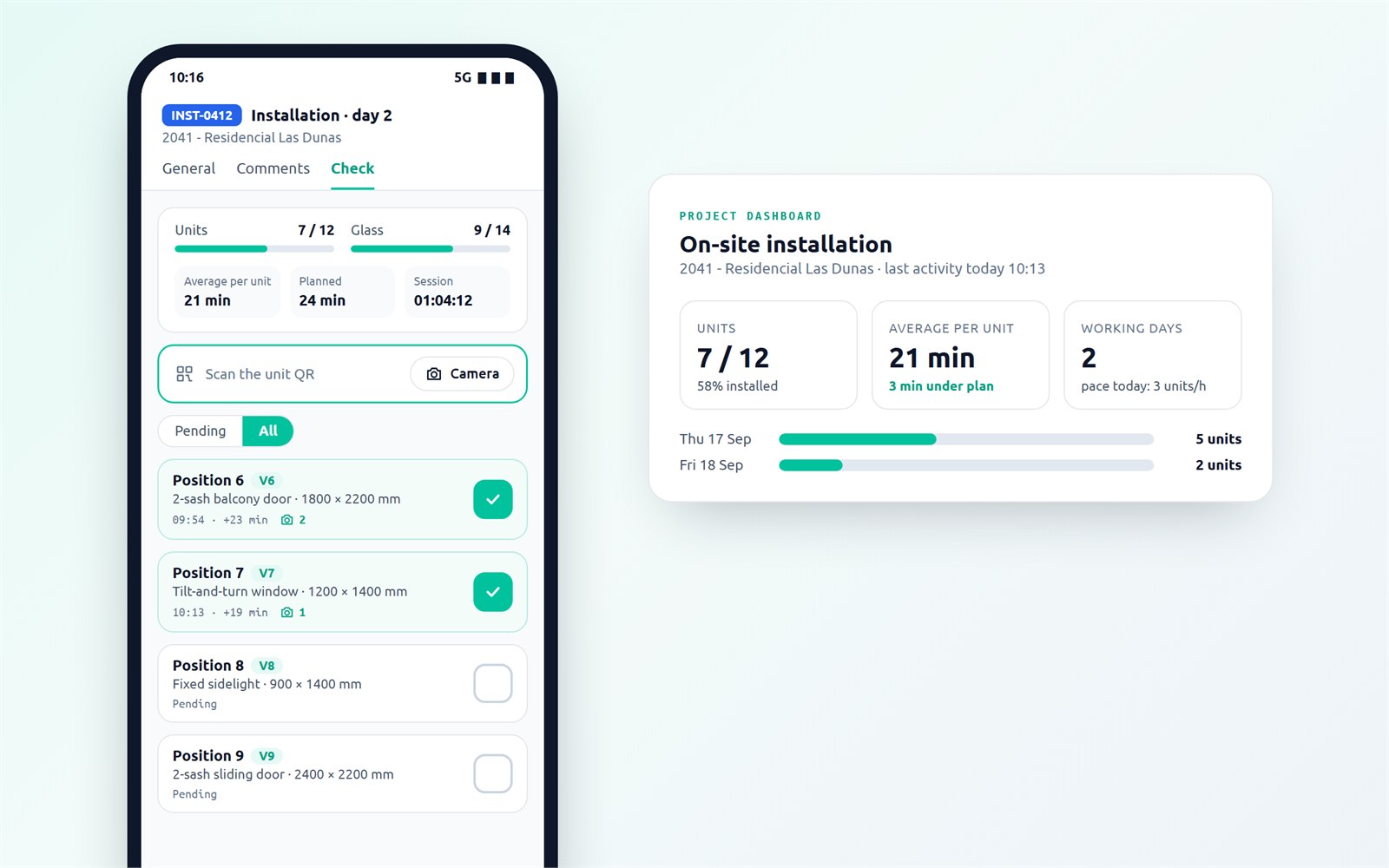
Every installation appointment has a Check tab listing the units and glass panes that came out of production. The installer ticks them off by scanning the QR or by hand, and can attach photos from the phone camera to each item.
Every tick keeps its timestamp, so the project shows what really happened on site: units installed, average time per unit, pace of the last day, working days and deviation from the plan.
Recycle bin: 30 days to change your mind
Deleting a quote, an order, a purchase invoice, an installation or an entire project is no longer final: Nexus keeps a full copy for 30 days and restores it with one click, with its history and its place in the traceability chain. The document owner is notified when someone deletes it.
Invoicing: send the whole month of invoices in a single pass
Tick the invoices and Nexus prepares one email for each: recipient proposed from the customer’s Invoicing contact, copies, subject, body from your template and the PDF attached. Review everything on one screen, send, and download all the PDFs as a ZIP if needed. From the same selection you can duplicate recurring invoices with a new number and date.
Also, each document can be shown in the customer’s currency: amounts, lines and due dates show the equivalent at a frozen exchange rate, without touching the accounting.
The pipeline board gets headline figures (open, estimated, quoted, overdue activities, closings this month), one-tap filters — I am the owner, Overdue activity, Unread emails — and cards with a health indicator.
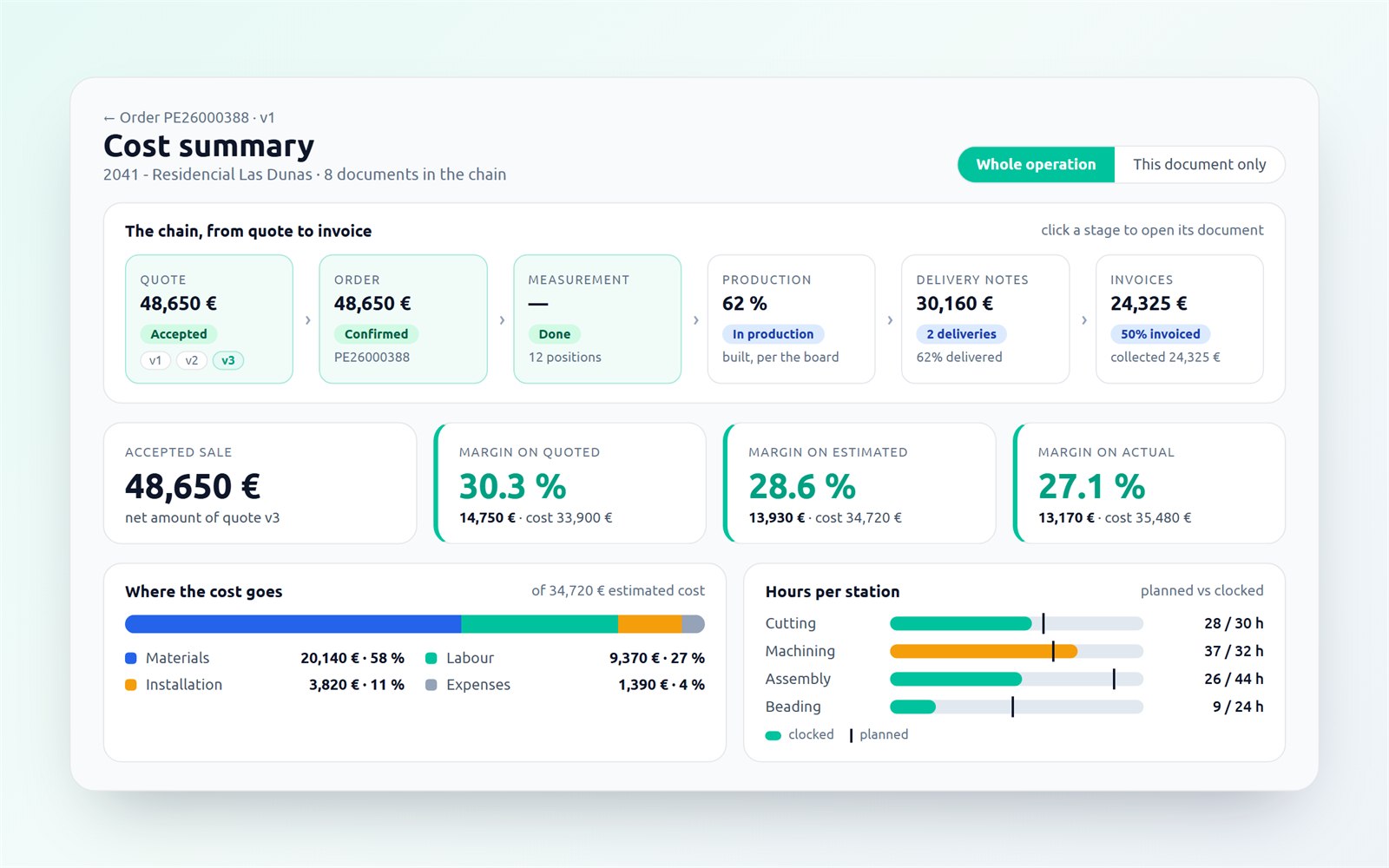
And the cost summary now covers the whole operation: quote, order, production, delivery notes and invoices on one ribbon, with three margins — on quoted, estimated and actual — and actual cost taken from received purchases, shop-floor clock-ins and installation.
Fewer clicks across the whole application
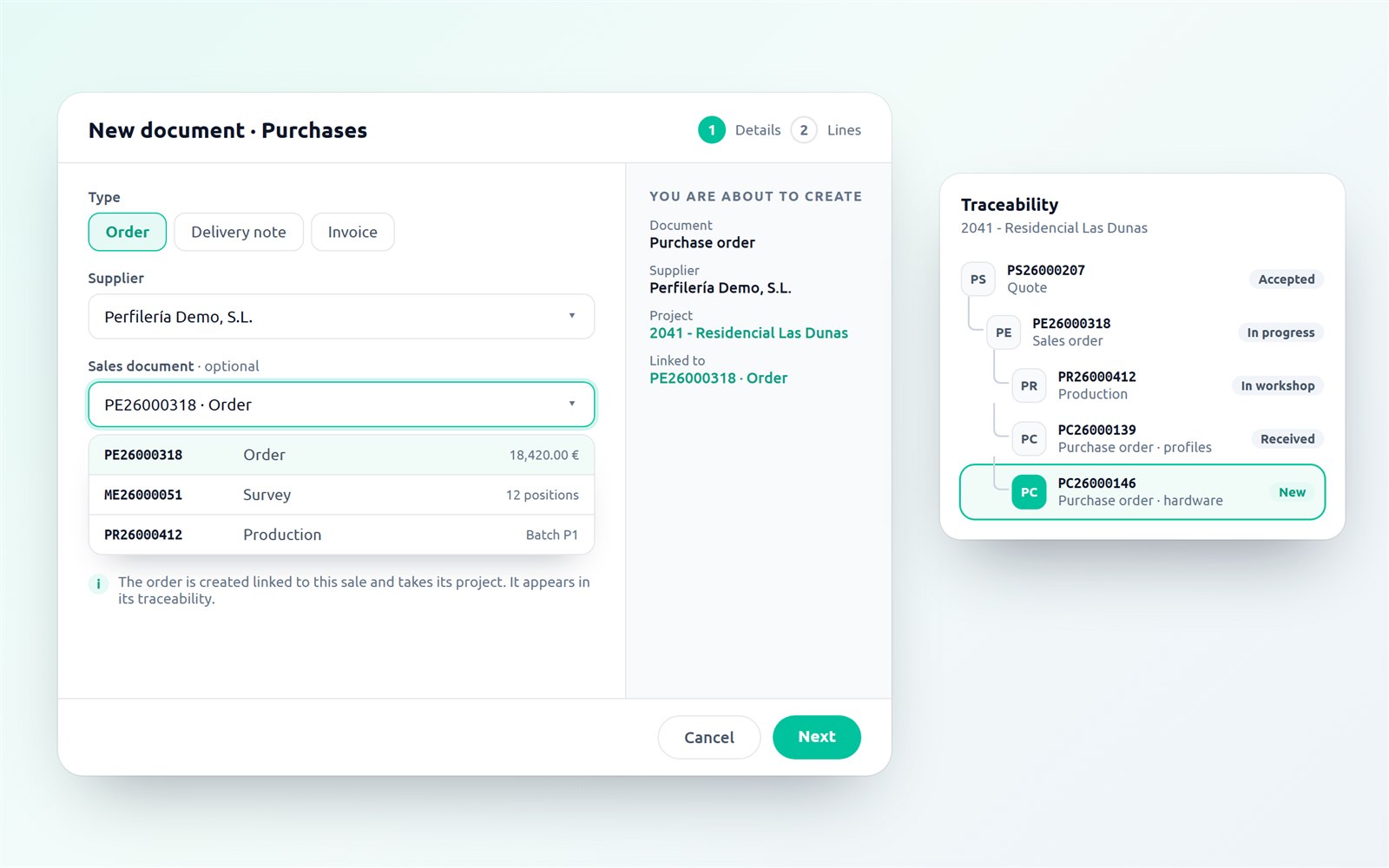
Every sales, purchasing, installation and project document shows its stage ribbon at the top and a Next step button with what comes next. Creating a document is a two-step wizard with a «You are about to create» summary always in view.
Lists remember filters, sorting and page when you come back from a record; tables fold their filters away, offer a compact density and read as cards on a phone; and on document lines, Enter saves.
Machining: from catalogue to machine, no surprises
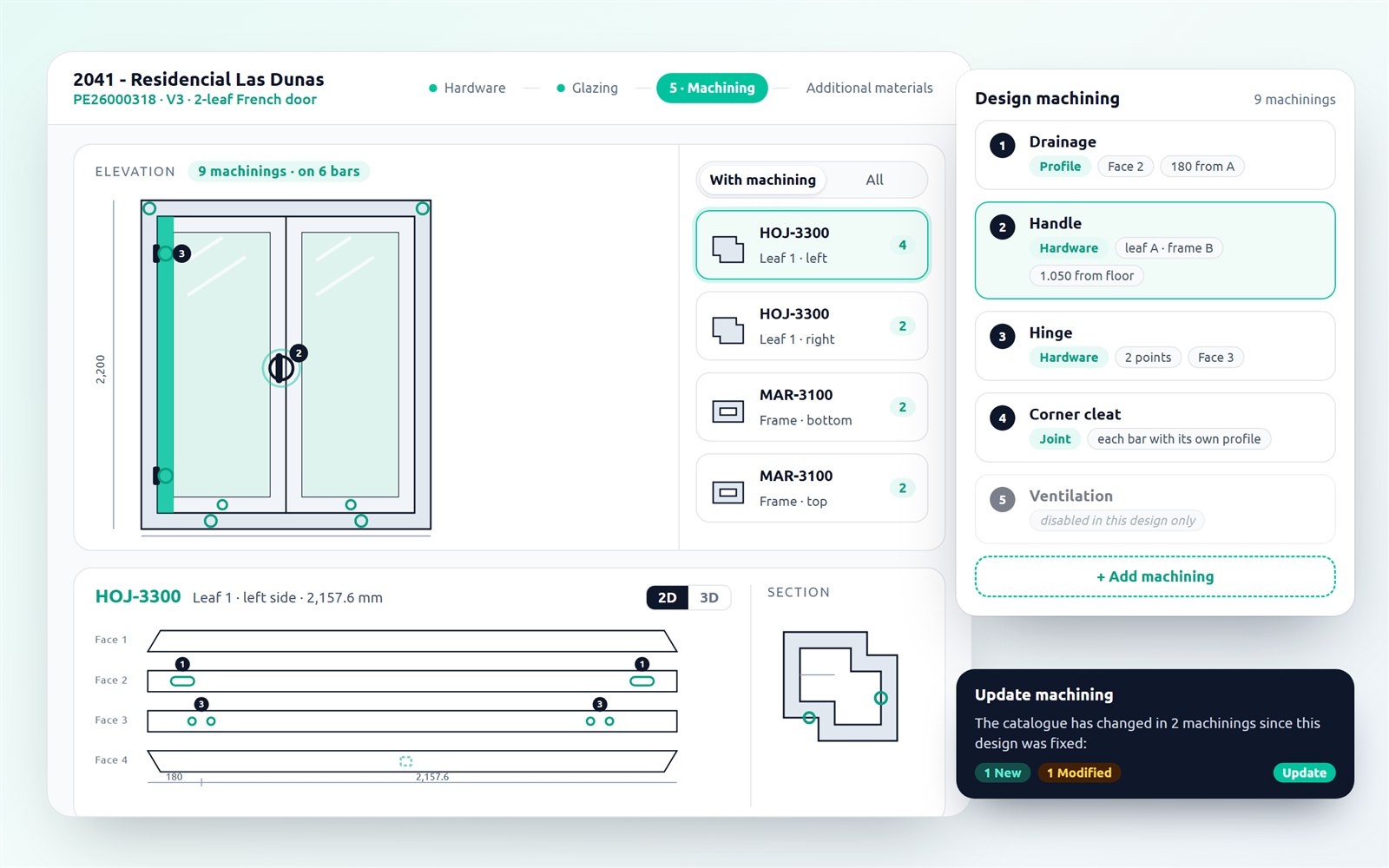
The Editor gets a new step, 5 · Machining: the elevation with every machining marked, the selected bar by faces or in 3D, its section alongside, and a list where you add, move or disable a machining in this design only.
Machinings no longer depend only on the profile: they are also triggered by the hardware (handle and hinges machine the leaf and the frame at the height they are fitted), by the joint (each bar with its own positioning) and by the deduction. Each design keeps its own definitions: a catalogue change does not alter what is already quoted until you press «Update machining», which first shows what will change. And production builds the saved design exactly as it is: what you see in the Editor is what reaches the station.
Sliding windows and glass, edited right on the drawing
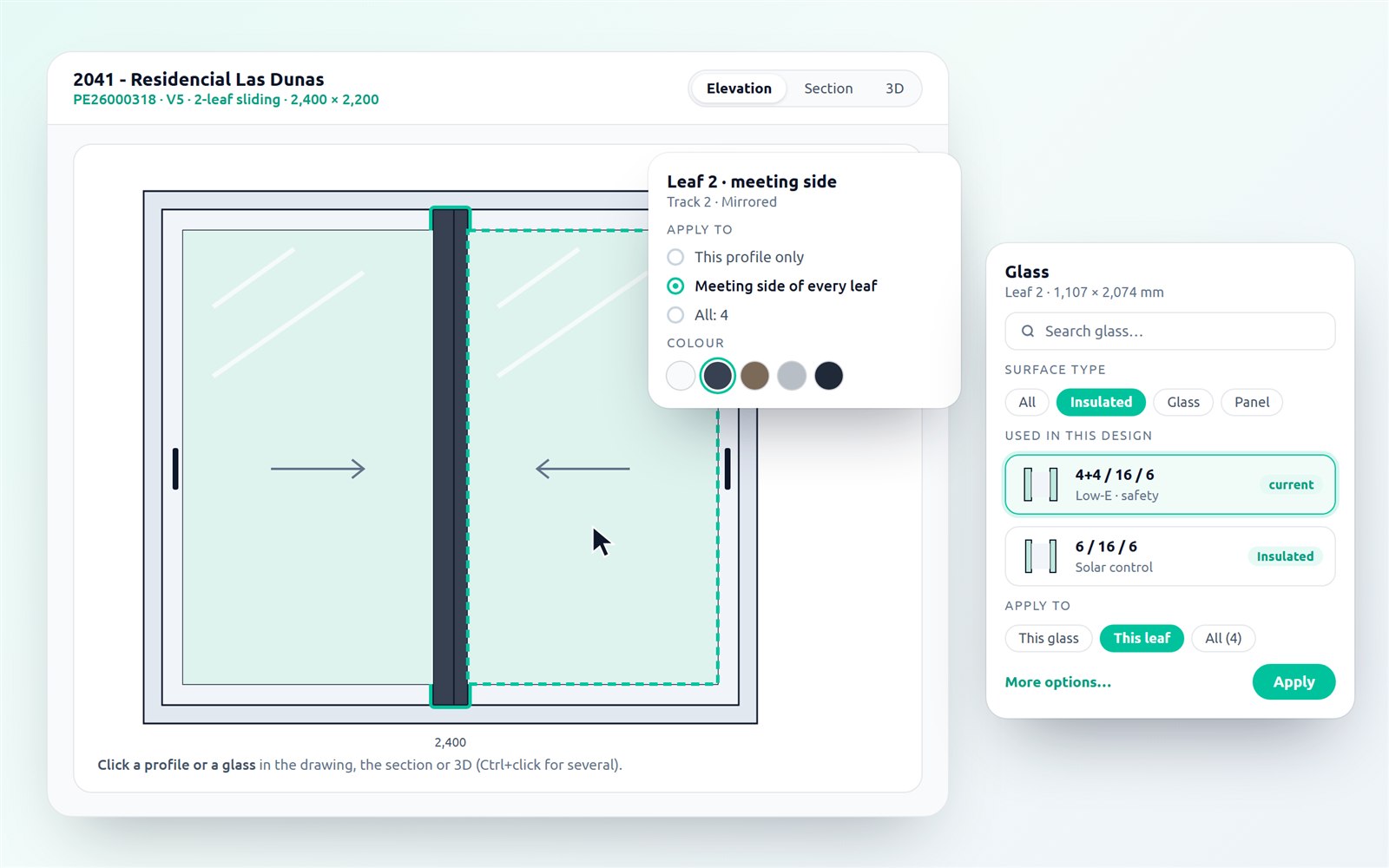
On sliding windows each leaf can take a different profile and colour per side, with «Apply to» this profile, that side on every leaf or the whole section. Each system sets its default profiles, and casements choose their threshold and bottom rail.
To change a glass, just click it in 2D, in the section or in 3D: a card opens with the system glass, a filter by type and insulated units composed right there. Sections show labels with the reference of each profile and the real glass dimension.
Purchases linked to the sale from the start
A purchase order can be created already linked to a sales order, survey or production, and takes its project. Orders created on their own can be linked later from «More actions», with «Change» and «Unlink», and they show up in the traceability of the sale.
In invoicing, a down payment can be entered as a % of the total and the amount is worked out automatically.
Redesigned shop-floor labels, printed from the browser
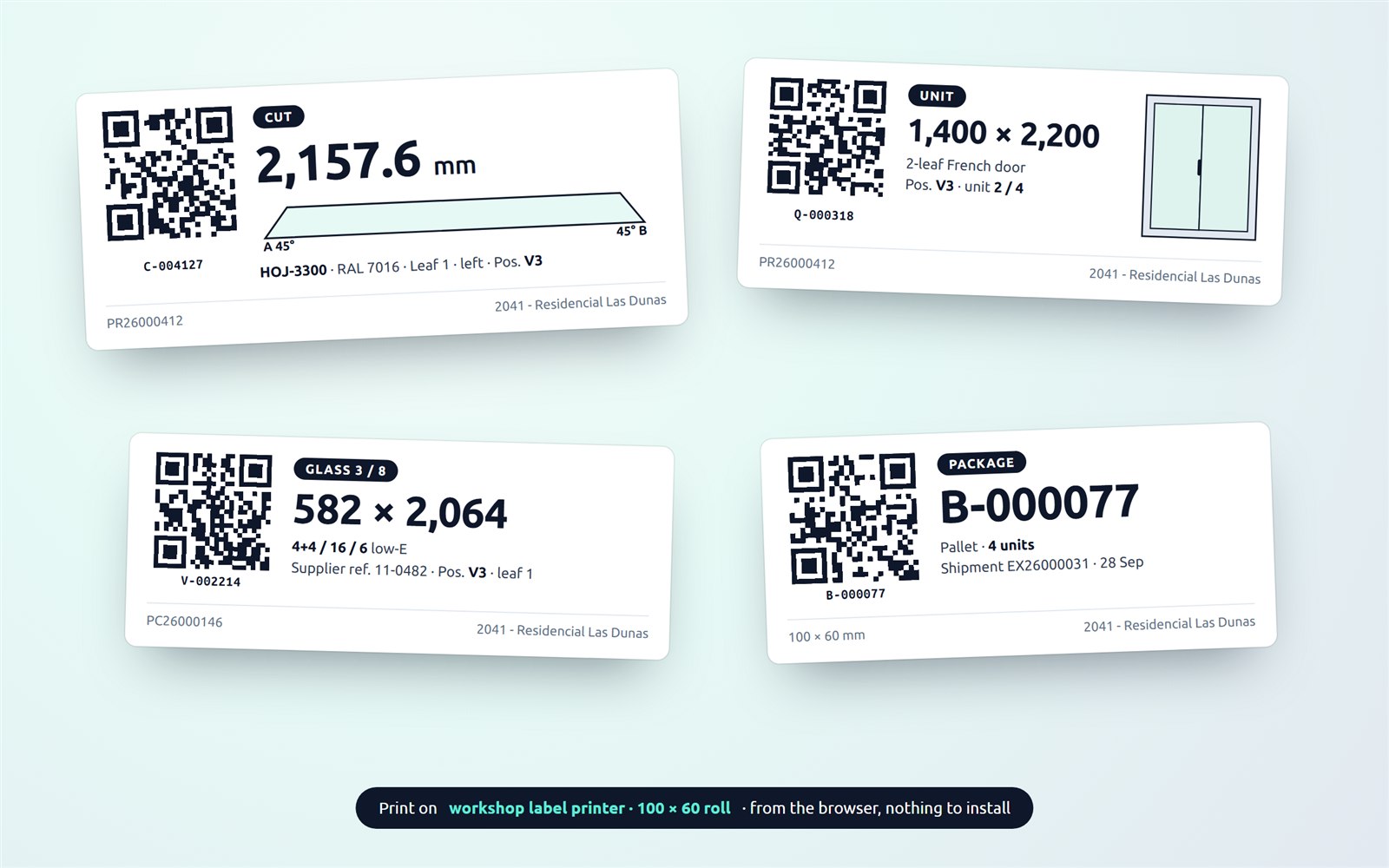
Cut, unit, glass and package labels share one design: the key figure in large type (length to one decimal, glass size, package code), the cut drawn with the angle of each end and the QR with its readable code.
They print at roll size from a PC or tablet, on any printer with a driver, with nothing to install.
Nexus Clad: the building, without fighting the DXF
Three new ways to start: create levels and walls straight from the wizard, draw in sketch mode by typing the length of each wall, or trace a plan from an image, calibrating the scale with two points. For those who do start from a DXF: a guide with a downloadable template, import warnings that say what to fix, and rejected geometry drawn in red.
Also: exact mitres and inside corners at any angle, a panel detail PDF ready for the shop floor, and nesting now explains why a part does not fit and how to solve it.
Nexus notifications now arrive by email too, from a company no-reply account · «Forgot your password?» on the sign-in screen, with a single-use link · bulk labour shows what it will affect before applying, with Undo · each document keeps its own copy of the design: changing the order no longer touches the quote · due dates and retentions total the selection · configurable installation language, German included · report an issue to support from any screen (Alt+I), with an email acknowledgement · attachments and production documents in a near full-screen viewer · permissions for several users at once, in blocks · column filters with several values in every list · quotes start as «Pending» and move to «Sent» when emailed · the customer record separates registered, delivery and billing addresses.
August 2026
CRMCalendarsProductionDealersNexus Clad
Customer emails land on the right deal, calendars show holidays and absences, and your dealers now send quotes
A month focused on removing friction from the daily sales routine and on giving dealers the same circuit as the factory.
Every email lands on the deal it belongs to
When a customer replies to a quote, Nexus recognises the thread and files the email under that pipeline deal — even if the customer has several open opportunities or replies from a different address. If it cannot be sure, the email waits in an unassigned tray to be decided with one click, instead of being duplicated.
Optional: every deal now has its own email address (sales+d123@yourcompany.com) to CC from Outlook or hand to the customer.
Tasks and installations on the real working calendar
The activities calendar and the installation planner now show your company's non-working days and public holidays, and each person's absences as initials — the same ones you see in My space. Planning a visit or an installation on a holiday, or with the installer on leave, is visible at a glance.
Also: when a task is assigned to someone (or reassigned), that person gets a notification in Nexus; and tasks open with a single click from the month view.
Shop floor: every screen of the batch updates on its own
When an operator marks a cut, a machining or any stage, all the other monitors open on the same batch — and the board — refresh instantly and show who did it and from which station. No action can be recorded twice even if two people press at once, and each station header shows who is on this batch. All without extra load on the database.
Dealers: they quote, accept, invoice… and now send by email
The dealer channel gives your distributors a simplified Nexus: they quote with your price list and your templates, on the same projects the factory sees, with no access to production, purchasing or costs. This month they can also send the quote by email with the PDF attached and their own brand identity, from their own email account.
Nexus Clad: ventilated facades and composite panels, with a real case
New page dedicated to ACM and composite panel cladding software, and a published case with figures: 1,346 panels nested onto 184 sheets at a 90.6% material yield, from the building DXF to the quote in seconds.
Quick change of the sales rep from the deal page · every notification now opens its destination with one click, also from the dashboard · office time is now tracked in the activities agenda too · faster data downloads on cloud installations.